
For a long time, deploying either of my .NET sites meant recreating its Docker Compose service in place.
The process was simple: pull an image, replace the container, wait for it to become healthy. It also guaranteed a gap. For a few seconds Traefik had no backend to route to, so requests returned 404 until the replacement appeared.
I wanted a deployment that kept the incumbent serving while it proved a candidate, moved traffic only when the candidate was ready, and put the old version back if the final public check failed. The applications already used Docker Compose and Traefik on one small VPS. Adding Kubernetes to replace one container at a time would have introduced far more machinery than the problem justified.
I built the swap as a shared GitHub composite action backed by a shell state machine. It now deploys two ASP.NET applications in staging and production.
This is how it works, including the parts that were less obvious than “scale to two, then back to one”.
What zero downtime means here
It means one specific thing:
Replacing an application container without a gap in served HTTP requests.
It does not make the VPS highly available. Traefik is still the only process publishing ports 80 and 443. PostgreSQL is still one container with one volume. Docker, the host, its disk and its network are all shared. A host reboot or Traefik restart is downtime.
The deployment protects against a bad application release and against removing the working container too early. It does not protect against the machine disappearing.
That boundary is why I did not build permanent blue and green environments. Two colours on the same host, behind the same proxy and using the same database, would not provide failover for any shared failure. They would keep a second copy of each application consuming memory, and Gaming Seeds would have two permanent Hangfire servers capable of processing the same queues.
The only benefit I needed was temporary overlap while changing a release. Docker Compose could already give me that.
The topology
Traefik discovers containers through Docker labels and routes both instances of a service through one load balancer.

At steady state there is one application container. During a deployment, Compose scales the service to two. Traefik can see both, but the candidate initially refuses traffic. Only after the deployment checks it does the candidate join the load balancer; only after Traefik is observed serving it does the incumbent leave.
That middle state is the whole design.
Docker health is too early
My first design relied on the existing Docker health check. Start the candidate, wait until it is healthy, then remove the old container.
There is a race in that sentence. The moment Docker marks the candidate healthy, Traefik can begin routing real requests to it. The deployment may not yet have checked its migration state, its important pages or its version. “Healthy enough for Docker to keep running” is not the same as “approved to receive production traffic”.
The applications now expose four deployment endpoints:
| Endpoint | Meaning |
|---|---|
GET /healthz | The process is running, PostgreSQL is reachable and a baseline table exists |
GET /healthz/migrations | Every EF Core migration required by this image exists in the database |
GET /healthz/traffic | This particular container has been admitted to receive traffic |
POST /healthz/admit and /healthz/drain | Add or remove the container’s local admission marker |
Docker uses /healthz. Traefik uses /healthz/traffic.
A freshly created container has no admission marker, so it returns 503 from the traffic endpoint even after its Docker health check passes. The deploy executes its probes inside the candidate against loopback, performs the remaining checks, and then calls the admission endpoint the same way.
The marker is a file inside the container. That choice gives it useful semantics:
- it is absent from a newly created container, so admission fails closed;
- it survives
docker stopanddocker start, which makes rollback possible; - it disappears when the container is removed;
- the application does not need a second service or shared data store merely to remember readiness.
Creating an application container manually therefore leaves it unavailable to Traefik. That is intentional. The deployment workflow owns admission.
The swap, in order
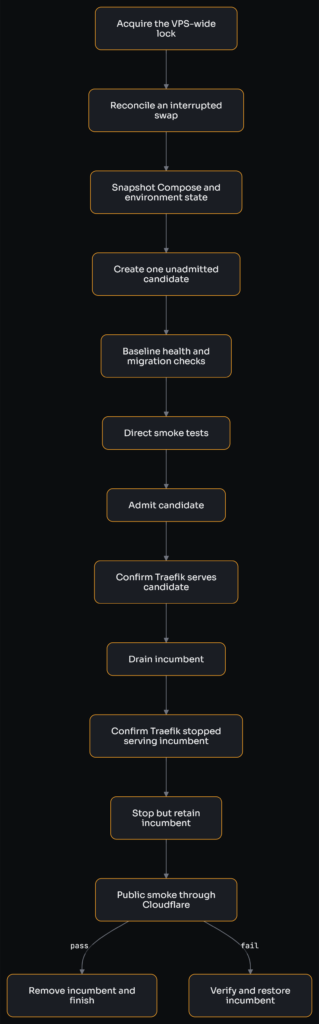
There are several details hidden inside those boxes.
1. Lock and reconcile
Every application deploy, infrastructure deploy, backup and maintenance operation takes the same flock on the VPS. GitHub Actions concurrency can coordinate runs within one repository, but it cannot prevent Bet Shrew, Gaming Seeds and vps-infra from changing shared Docker or PostgreSQL state at the same time.
Before starting a new swap, the action checks for a deployment journal left by an interrupted run and reconciles it against the containers that actually exist. It does not assume the last recorded operation completed or did not complete.
2. Record the incumbent and snapshot desired state
The swap requires exactly one running service container. It records that container’s ID, image and reported application version.
It also snapshots the current Compose file and .env. This is easy to overlook. If a candidate is rejected but its configuration remains installed on disk, a later docker compose up, maintenance run or host restart can recreate the rejected release. Restoring the running container without restoring desired state is not a rollback.
3. Pull and identify the exact image
The action pulls the released X.Y.Z tag and records its image ID. After Compose creates the candidate, the action confirms that the container is running that exact image ID rather than trusting the mutable relationship between a tag and an image.
4. Scale to two
The service is scaled with --no-recreate, keeping the incumbent untouched while Compose adds one container.
The candidate is identified by taking the set difference between the container IDs before and after the scale-up. It is not identified by a Compose replica number.
That distinction came from measuring real swaps. Compose assigns available slots, so the candidate’s suffix alternates between deployments. Sometimes the new container is -2; after the next swap it may be -1. Code that assumes the highest number is new will eventually delete the live container.
5. Test the candidate directly
While the candidate still returns 503 to Traefik, the action contacts it directly and checks:
- baseline application health;
- required migration state;
- Docker’s own health status;
- each configured smoke path.
Any failure here removes the candidate, restores the previous Compose and environment files, and leaves the incumbent serving. The failed release has never received a public request.
6. Admit it, then read the result back
The deployment posts to the candidate’s admission endpoint and then reads /healthz/traffic directly.
The read-back matters. A successful POST response is not proof that the marker exists, and a lost response is not proof that it does not. Draining the only other backend on the strength of an assumed state would create exactly the outage the protocol is meant to prevent.
7. Prove Traefik is using the candidate
Every application response carries an X-App-Version header. While the two containers run different releases, one public response naming the candidate’s version proves that Traefik has health-checked it and placed it in rotation.
Waiting for several consecutive candidate responses would not provide stronger evidence. At this point both containers are admitted and Traefik is round-robining between them. In the first staging swap, waiting for three consecutive new-version responses consumed 27.5 seconds of a 28-second overlap because the check was effectively asking a round-robin to stop behaving like one.
A redeploy of the version already running is different. Both containers report the same version, so no number of matching headers identifies an instance. In that case the action says what it cannot prove and waits for three Traefik health-check intervals. An instance-specific response header would remove this weaker branch, but I have not added application complexity solely for that case.
8. Drain the incumbent
Once the candidate is demonstrably in rotation, the action drains the incumbent. It waits three health-check intervals and then polls the public site until every observed response names the candidate version.
Only then is the incumbent stopped. It is deliberately retained rather than removed, so rollback can use docker start instead of pulling and recreating an image while the site is already in trouble. Docker receives a 45-second stop timeout so in-flight ASP.NET requests have time to complete.
9. Verify through the real public route
The final smoke test goes from the VPS to the public URL, through Cloudflare and Traefik, and requires the requested version header. This proves more than a localhost request: DNS, TLS, Cloudflare, Traefik routing and the selected application are all on the path.
If it passes, the old container and the saved desired state are removed and the journal is cleared.
If it fails, rollback begins while the old container is still available locally.
Rollback is another deployment
Rollback is not “start the old container and hope”. The action:
- starts the retained incumbent;
- checks its Docker health and smoke paths directly;
- re-admits it;
- drains the candidate and confirms that Traefik serves the incumbent publicly;
- removes the rejected candidate only after that confirmation;
- restores the previous Compose file and
.env.
If the old container cannot prove it is healthy, the action leaves the candidate serving and reports failure. That is an uncomfortable result, but it is safer than taking down the only application instance that is still responding in order to complete a tidy-looking rollback.
The database is outside this promise. Migrations run before the swap, and restoring an image does not reverse schema. All migrations must therefore be compatible with the incumbent and candidate at the same time. The CI pipeline rejects known contracting DDL, and a production migration is preceded by a fully readable pg_dump, but an automatic application rollback always leaves the schema forward.
The journal records intent
Remote deployment has a failure mode that local scripts tend to ignore: the SSH connection can disappear after the server has already acted.
An SSH client returning 255 does not mean no session was created. It may mean the connection died after the candidate was admitted, after the incumbent was drained or after the incumbent was stopped. Blindly retrying the entire swap can then treat a half-completed deployment as a fresh one.
Every mutation is bracketed in the journal:
candidate-create-intent
candidate-created
candidate-admit-intent
candidate-admitted
old-drain-intent
old-drained
old-stop-intent
old-stopped
public-smoke-passed
Intent is written before the mutation and confirmation afterwards. If execution stops between them, recovery knows which operation was in flight but still inspects Docker to learn what actually happened.
The swap itself is never automatically retried after a transport loss. A later run first reconciles the journal. This is slower than optimistic retry and much safer than repeating an operation whose effects are unknown.
The health check that was not checking health
The admission design nearly shipped with an ineffective Traefik gate.
Traefik contacts a container by its Docker-network address and supplies that address as the host. Both applications normally redirect unknown hosts to their canonical www domain. The health request therefore received a 308 redirect.
Traefik considered that response healthy.
The endpoint existed, the label was correct and the dashboard displayed a healthy backend, but the application code that reads the admission marker had never run. Staging did not expose the problem because its hostname happened to take a different route through the canonicalisation logic.
Both applications now exclude /healthz paths from host canonicalisation, and the production probe was measured directly by container address: 200 while admitted and 503 while drained.
The lesson was not merely “remember redirects”. A health check must prove the behaviour it is meant to gate. Receiving any HTTP response from roughly the right process was not enough.
What the first real swaps showed
I ran one request per second through the previous recreate deployment and through the first production swaps.
The recreate produced three to four seconds of 404 responses while the old router backend had disappeared and the replacement had not arrived.
The swaps produced:
| Application | Responses | Result |
|---|---|---|
| Bet Shrew | 1,083 / 1,083 | HTTP 200 |
| Gaming Seeds | 853 / 853 | HTTP 200 |
For roughly 28 seconds, responses alternated between the old and new application versions. Then the old version disappeared from rotation. There was no non-200 response.
That overlap is deliberate. Traefik learns about admission and drain on health-check intervals. Avoiding overlap would mean draining the incumbent before proving the candidate was routable, replacing a harmless transition with a possible gap.
It does impose an application constraint: adjacent releases must be able to serve concurrently. Database changes must be backward-compatible, cookies and shared state cannot change incompatibly, and background processing must tolerate the short period with two application instances. Gaming Seeds uses Hangfire’s storage-backed coordination, and I avoid unnecessary production promotions during its busiest recurring-job window.
Testing the state machine
The implementation is shell because it ultimately coordinates docker, curl, flock and files on one Linux host. The important part is not the language; it is keeping the protocol in one shared action instead of copying it into four workflows.
The test suite drives the remote script against controlled Docker and curl doubles. It covers candidate failures, lost admission responses, public-smoke rollback, interrupted journal phases, wrong image IDs, ambiguous container counts and failures during recovery.
I also test selected safety properties by mutation: remove the journal write, identify the candidate by replica number, stop restoring desired state, admit a new container by default, or let an SSH failure retry. The mutation counts only when the suite runs and an assertion fails; a crashed harness is not evidence.
This found tests that were green because they matched comments describing the required command rather than the command itself. Those were tests of documentation, not behaviour.
Was Kubernetes the easier answer?
Kubernetes has established rollout, readiness and reconciliation concepts. It would also introduce a control plane, manifests, another networking layer and a larger operational surface onto the only small server in the system.
I did not need general scheduling or horizontal scaling. I needed one tested transition between two instances of one Compose service. Traefik already provided discovery and load balancing; Docker already provided lifecycle and health; flock provided cross-process exclusion. The missing pieces were explicit admission, a journal and a recovery policy.
The resulting script is not trivial. That complexity belongs to the guarantee I chose. For a site where a few seconds of maintenance is acceptable, docker compose up -d remains a perfectly reasonable trade.
For these applications, the best outcome is not the zero in “zero downtime”. It is that a candidate can fail its startup, migration or smoke checks without receiving a request and without displacing the working version. Continuous availability is the visible effect. Containing a bad release is the reason I kept the design.
No responses yet