
I was paying about £110 a month to host two hobby websites.
Neither is a business. Bet Shrew is a poker odds calculator; Gaming Seeds is a community site for sharing procedurally generated game seeds. Between them they serve about 500 visits a month. They were sitting on Azure App Service with two Azure SQL servers behind them, and every month the bill arrived and I paid it, because moving would be a lot of work!
It was four weekends worth of work, spread across a month. Both sites now run in Docker containers on a single £8.99/month VPS. Nothing runs on Azure any more.
Here’s what the move actually involved, including the parts I got wrong.
The numbers
| Before | After | |
|---|---|---|
| Bet Shrew — App Service + SQL | ~£55/month | £0 |
| Gaming Seeds — App Service + SQL | ~£55/month | £0 |
| VPS (2 vCPU, 8 GB RAM, 100 GB NVMe) | £0 | £8.99/month |
| Ops domain | £0 | ~£1/month |
| CDN/DNS, error tracking, backups | £0 (free tiers) | £0 (free tiers) |
| Total | ~£110/month | ~£10/month |
About £1,200 a year. To be clear I did not get better performance, better availability, or less work out of this. I got a smaller bill and a lot more control, but I now own a patch cycle I didn’t own before.
That trade is the whole story. I didn’t leave Azure because a VPS is technically superior — it isn’t. I left because at 500 visits a month I was renting a lot of managed infrastructure I wasn’t using, and paying for it at a rate that only makes sense if it’s saving you real operational work.
What replaced Azure
The box runs six containers: a Traefik reverse proxy, PostgreSQL, the two applications, Seq for logs, and Uptime Kuma for availability.
These aren’t like-for-like swaps, and it’s worth being honest about that — in most cases I traded a managed service for something I now operate myself.
- App Service → Docker Compose behind Traefik. Traefik terminates TLS and routes by hostname.
- Azure SQL → one PostgreSQL container, with a separate database and a separate non-superuser role per application. That’s a whole post on its own, and it is the piece that took longest.
- Application Insights → self-hosted structured logging. Serilog writing to a Seq container. Structured events, queryable by property, with alerts on error bursts. I gave up a managed observability platform — and its retention, its scaling and its uptime — for a container I have to keep alive myself.
- Managed backups → a backup pipeline I own.
pg_dump, encrypted withage, pushed nightly to object storage, with an automated monthly restore test into a throwaway container. Azure was doing this invisibly. Now it’s mine, and so is finding out when it stops working. - Azure-managed TLS → Cloudflare edge TLS plus my own origin certificate. Two separate hops rather than one managed one, which I’ll come back to below.
- Secrets stayed in a hosted secret store, but the box holds none of them. CI federates in with a short-lived credential at deploy time, writes the environment file, and that’s the only moment anything is fetched. No standing credential lives on the server, and neither application makes a runtime call to any cloud provider — an outage at one couldn’t stop either site booting.
The architecture
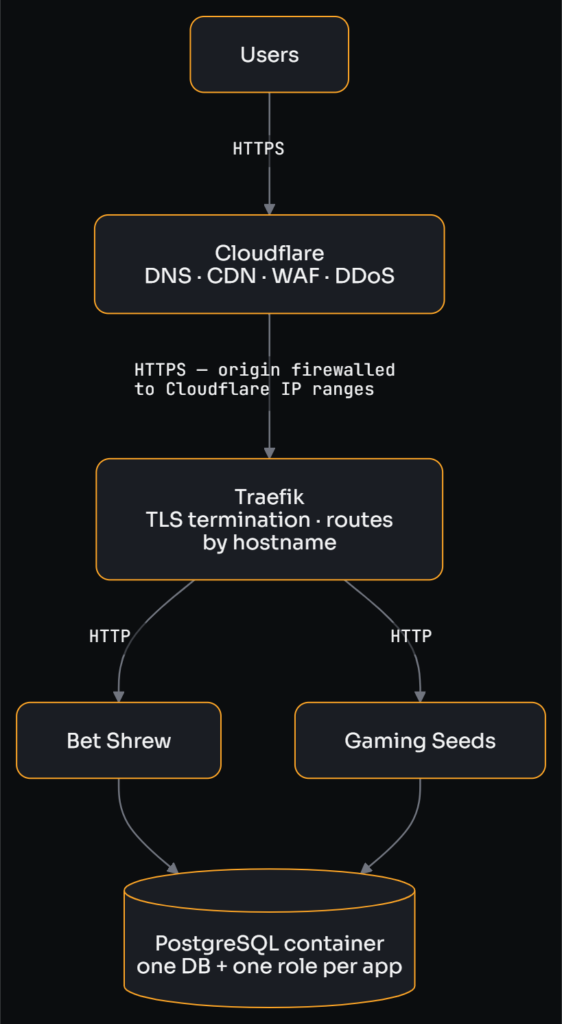
That’s the entire public path: one hostname per site, one proxy, one database container with a separate database and role for each application.
What can reach what
The more interesting picture is the one the request path doesn’t show — which containers are reachable from where.
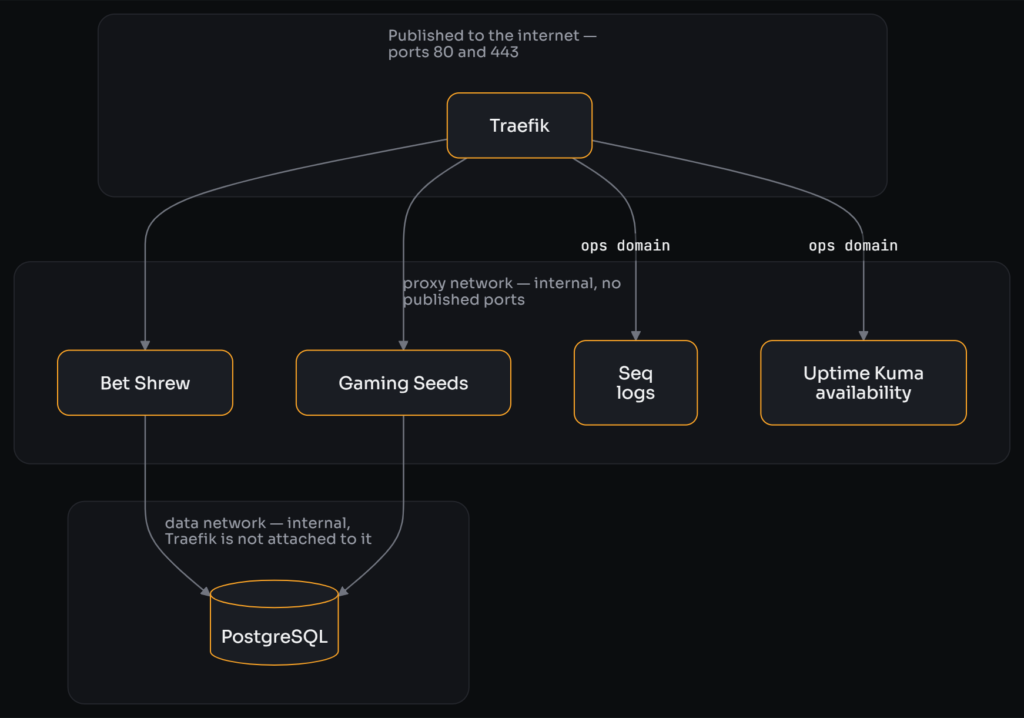
The two application containers are the only ones attached to both networks, which makes them the only bridge between them. Serilog ships logs to Seq across the proxy network, so nothing has to be published for that either.
Two details there matter more than they look.
Only Traefik publishes a port. Postgres, Seq and Uptime Kuma have no published ports at all — they’re reachable only over internal Docker networks. The database sits on a network the proxy cannot even see, so the only route to it is through an application container.
The origin is firewalled to Cloudflare’s IP ranges. If your origin IP is discoverable — historical DNS, certificate transparency logs, Shodan — anyone can hit it directly and skip your CDN’s WAF and DDoS protection entirely. Restricting 80 and 443 to your CDN’s published ranges is the only thing that closes that, and it’s the reason the rest of the security model holds.
How TLS actually works here
This confused me for longer than it should have, so it’s worth spelling out. There are two separate TLS connections:

The browser never talks to my server. It completes a TLS handshake with Cloudflare, using Cloudflare’s publicly trusted edge certificate. Cloudflare then opens a second, separate HTTPS connection to my origin, and that’s the one my certificate is for. Cloudflare’s SSL/TLS mode is set to Full (strict), which means it validates my origin certificate on every pull rather than accepting anything.
So the certificate on my box only ever needs to be trusted by Cloudflare — and that let me skip Let’s Encrypt entirely.
Every VPS tutorial reaches for certbot. I used a Cloudflare Origin certificate instead: issued by Cloudflare’s own private CA, valid for fifteen years, trusted by exactly one client that happens to be the only one that can reach my server. Traefik loads it as a static file.
For my setup, that bought two things:
- No renewal machinery. No ACME resolver, no 90-day cycle, no renewal failure at 3am in fourteen months’ time.
- No DNS-edit API token on the server. This was the real prize. Because the firewall blocks Let’s Encrypt’s validators from reaching my origin, HTTP-01 and TLS-ALPN-01 are both out — I’d have needed DNS-01, which requires a token that can rewrite my DNS living permanently on the box purely to answer challenges. That would have been the most powerful credential on the machine, and now it simply doesn’t exist.
The trade-offs are real and I’d rather state them than skip them: the origin certificate isn’t publicly trusted, so hitting the server directly throws a browser warning, and the whole design is now hard-coupled to keeping Cloudflare in front. Both of those were already true of my firewall rules, so I lost nothing I had. If you don’t want that coupling, this isn’t the right choice for you.
The one application code change
Everything else was configuration. This one wasn’t.
TLS terminates at the proxy, so requests arrive at the container as plain HTTP. An ASP.NET app enforcing HTTPS in production sees scheme=http, decides it needs to redirect to HTTPS, and redirect-loops forever. Along the way it also emits insecure cookies and generates wrong absolute URLs in canonical tags, OG tags and sitemaps.
The fix is ForwardedHeaders middleware, configured to honour X-Forwarded-Proto and X-Forwarded-For. It has to run before any middleware that makes a decision based on the scheme or the client IP — HSTS, redirects, authentication. In practice, I put it first in the pipeline so everything downstream sees the original scheme and client IP.
var forwardedHeadersOptions = new ForwardedHeadersOptions
{
    ForwardedHeaders = ForwardedHeaders.XForwardedFor | ForwardedHeaders.XForwardedProto
};

forwardedHeadersOptions.KnownNetworks.Clear();
forwardedHeadersOptions.KnownProxies.Clear();
app.UseForwardedHeaders(forwardedHeadersOptions);Those two Clear() calls deserve a warning. By default ASP.NET only trusts forwarded headers from proxies it knows about. Clearing both lists tells it to trust those headers from anywhere — and if a client can reach your app directly, it can now lie to you about its IP address and about whether the request was encrypted.
I did it anyway, because in this topology nothing can reach the container directly: the app publishes no ports and sits on an internal Docker network where the only thing that can talk to it is Traefik. The safety comes from the network layout, not from the app configuration. The reason I cleared the lists at all is that Traefik’s IP on the Docker network is dynamic, so there’s no stable address to pin.
If your application is reachable by anything other than your proxy, don’t copy this. Set KnownNetworks to your Docker subnet explicitly instead, and take the extra config over the trust.
The less obvious half: once forwarded headers were in, I deleted UseHttpsRedirection() from both applications. HTTPS is already forced at the Cloudflare edge, and again at Traefik’s HTTP entrypoint, with HSTS as a third layer. The in-app redirect was pure duplication — and it’s precisely the line that loops if the forwarded headers are ever misconfigured. What I kept was only the canonicalisation the app uniquely owns, like the apex-to-www redirect, which nothing upstream performs.
Why I migrated the boring site first
The single best decision I made was refusing to move both sites at once.
Bet Shrew went first, deliberately, because it was uninteresting: five migrations, no background jobs, no closure table, no image hosting. It was the low-risk pilot, so the entire pipeline — containerise, move the database, wire secrets, build the deploy, smoke test, cut over DNS, wait 48 hours — got proven end to end on the app where a mistake cost me nothing.
By the time Gaming Seeds moved, every mechanic was known and the only new problems were that app’s own. Each site also cut over independently and kept its old hosting stopped-but-not-deleted for 48 hours, so rollback stayed a DNS change throughout.
Both cutovers were zero downtime. Both sites served 200s throughout the entire teardown of the infrastructure they used to live on.
What went wrong
- Case-sensitive filesystems. Four images referenced
.pngwhile the files on disk were.PNG. Fine on Windows, fine on App Service, 404 in a Linux container. The migration didn’t create that bug, it revealed it — and Windows git’s defaultcore.ignorecase=truehides case-only renames, so I had to check againstgit ls-filesrather than my own checkout. - DataProtection keys. In a container the default key store is the local filesystem, so every restart logged users out and rejected form submissions. They need a mounted volume, writable by the non-root user the container runs as.
- The base image already has a user. I tried to
useradd appin my Dockerfile and the build failed telling me it already existed — the ASP.NET runtime images ship one at uid 1654. Chown the volume mount for that user instead of creating your own. - Uncomplicated Firewall (UFW) does not protect your containers. I set up UFW, allowed 22, 80 and 443, and felt secure. Docker inserts its own iptables rules ahead of UFW’s INPUT chain, so a container that publishes a port is reachable from the internet even when UFW is explicitly denying it. This is why the real boundary ended up being my host provider’s managed firewall, which filters before traffic reaches the VM — and why nothing but the proxy publishes a port.
The things I didn’t expect to own
This is the part I’d underweighted, and it’s the honest cost of the £100/month.
Patching. Security updates apply themselves automatically, but kernel updates need a reboot, and a reboot only works if every container comes back unaided. That means restart: unless-stopped on everything, and it means actually testing a reboot before you’re relying on it — which I did once, deliberately, while there was still no production traffic on the box.
Backups, and proving they work.

The restore test is the part that matters. An untested backup isn’t a backup — and mine taught me that lesson gently: the monthly test ran on the 1st, Gaming Seeds went live on the 7th, so on the day I wanted to delete the old databases my most recent successful test predated that site’s database entirely. It had logged “nothing to restore, skipping” and I’d never read the line.
Monitoring, including the bit that monitors the monitor. Uptime Kuma runs on the box it watches, so a total outage takes the alerting down with it — precisely the failure you most need to hear about. That needs one external check from somewhere else entirely.
Knowing when a scheduled job silently stopped. Every cron job’s failure output went to a log file nobody reads. They now each ping a heartbeat on success, so I get alerted when the ping doesn’t arrive. That’s the only construction that catches a job not running at all.
Keeping a firewall allowlist current. My origin is locked to Cloudflare’s IP ranges, and Cloudflare occasionally changes them. That’s now an automated weekly reconcile, but it’s another moving part that didn’t exist when a platform was handling it.
None of this is hard. All of it is mine now, and the bill for forgetting any of it arrives later and unpredictably.
What I’d do differently
- Write the deploy pipeline before the first cutover, not around it. I did a fair amount of manual work on the box that I later automated, and doing it in the other order would have made Gaming Seeds’ migration nearly free.
- Test against the real database engine earlier. My integration tests ran against SQLite and passed happily through every Postgres-specific bug I hit. A containerised Postgres in the test suite would have caught them before deployment rather than after.
Was it worth it?
For these two sites, yes — clearly, and I’d do it again.
I saved about £100 a month. I understand my own infrastructure far better than I did when a platform was hiding it, and I own decisions I’d previously been renting. Both migrations were zero downtime, which suggests the phased approach was sound rather than lucky.
But the answer changes entirely with the stakes, and it changes on one point: I am now the on-call engineer, the patch cycle and the disaster recovery plan. For a hobby project that’s a fair trade and a genuinely enjoyable one. For anything with customers and an SLA, £110 a month to make patching, backups, failover and recovery somebody else’s problem starts looking like a bargain rather than a rip-off.
Comments are closed